Power BI Desktop is a free application that you download and install on your local computer. Desktop is a complete data analysis and report creation tool that is used to connect to, transform, visualize, and analyze your data. It includes the Query Editor, in which you can connect to many different sources of data, and combine them (often called modeling) into a data model. Then you design a report based on that data model. Reports can be shared with others directly or by publishing to the Power BI service. Sharing reports requires a Power BI Pro license. The Power BI Desktop getting started guide walks through the process.
The Power BI service is a cloud-based service, or software as a service (SaaS). It supports report editing and collaboration for teams and organizations. You can connect to data sources in the Power BI service, too, but modeling is limited. The Power BI service is used to do things such as creating dashboards, creating and sharing apps, and analyzing and exploring your data to uncover business insights. What is the Power BI service details many of the capabilities of the Power BI service. Your license determines what you can do in the Power BI service. For more information about licenses, see Power BI licenses and subscriptions.
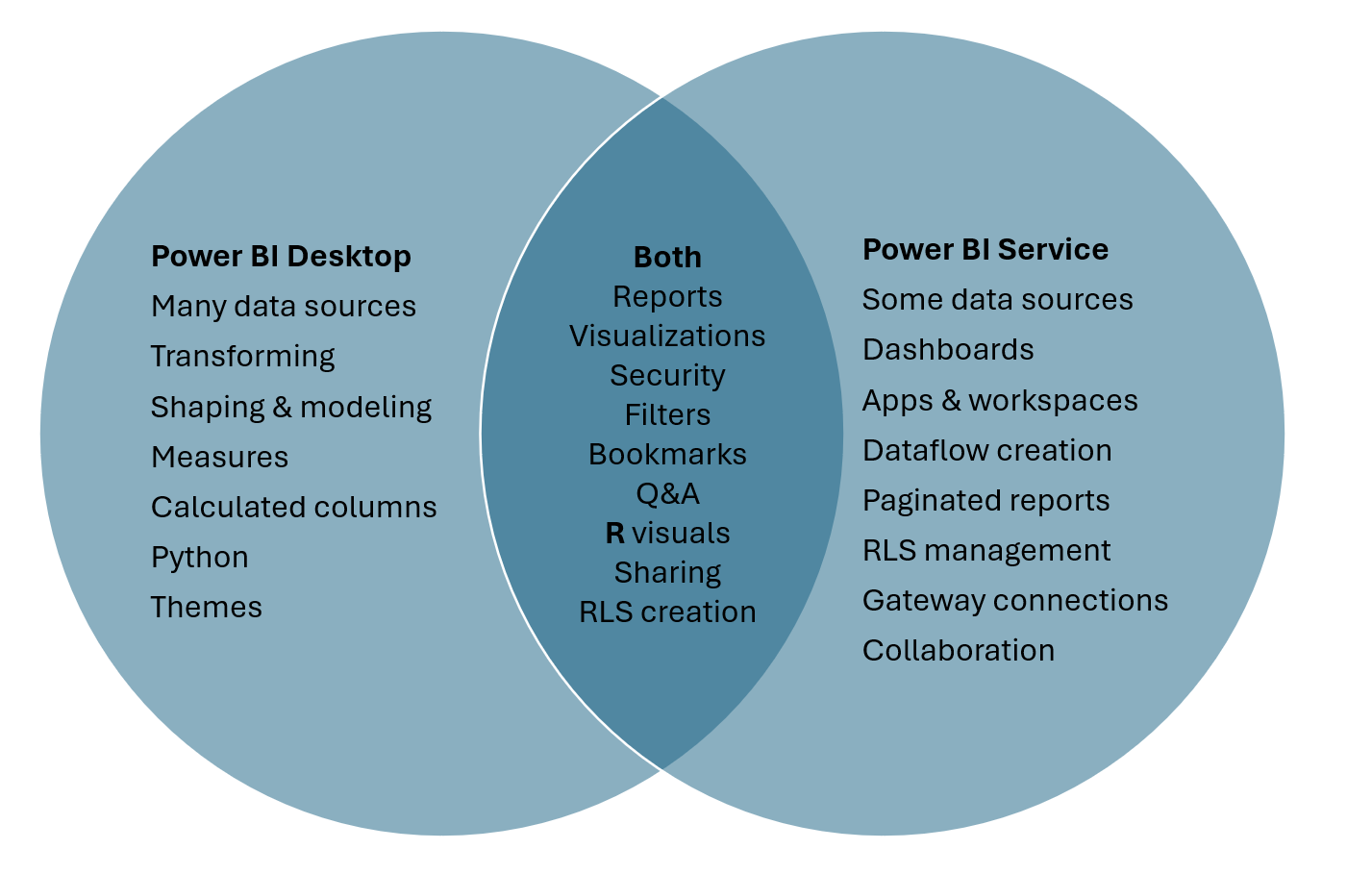
The following Venn diagram compares Power BI Desktop and the Power BI service. The middle shows some of the areas where they overlap. Some tasks you can do in either Power BI Desktop or the service. The two outer sides of the Venn diagram show the features that are unique to either the Desktop application or to the Power BI service.
Comments
Post a Comment